The Models page
On web and desktop, AnnotateIt organises AI around capabilities backed by interchangeable engines. The Models page shows the engines relevant to the current capability, marks incompatible choices as unavailable, explains why, and lists licence, size, runtime, speed and accuracy. Available engines can be downloaded, switched and removed locally. Mobile bundles its supported small engines and has no Models page.
Capabilities and engines
A capability is a job — segment an object from a click, turn a phrase into boxes, classify with no training, place a pose. An engine is a concrete model that does that job. Engines within a capability are interchangeable: switching one changes what every tool built on that capability uses, across the whole app rather than only in the project you happen to have open.
| Capability | Engines |
|---|---|
| Interactive segmentation | MobileSAM (built in) · SAM 2.1 Tiny · SAM 2.1 Small · SAM 2.1 Large · SAM 3 Tracker |
| Zero-shot & semantic search | CLIP (default) · SigLIP 2 |
| Text-prompt detection | Grounding DINO Tiny |
| Keypoints & pose | RTMPose-m · RTMPose-l · RTMPose-x |
| Auto-annotation | The curated model families below, plus your own ONNX model imported inside a project |
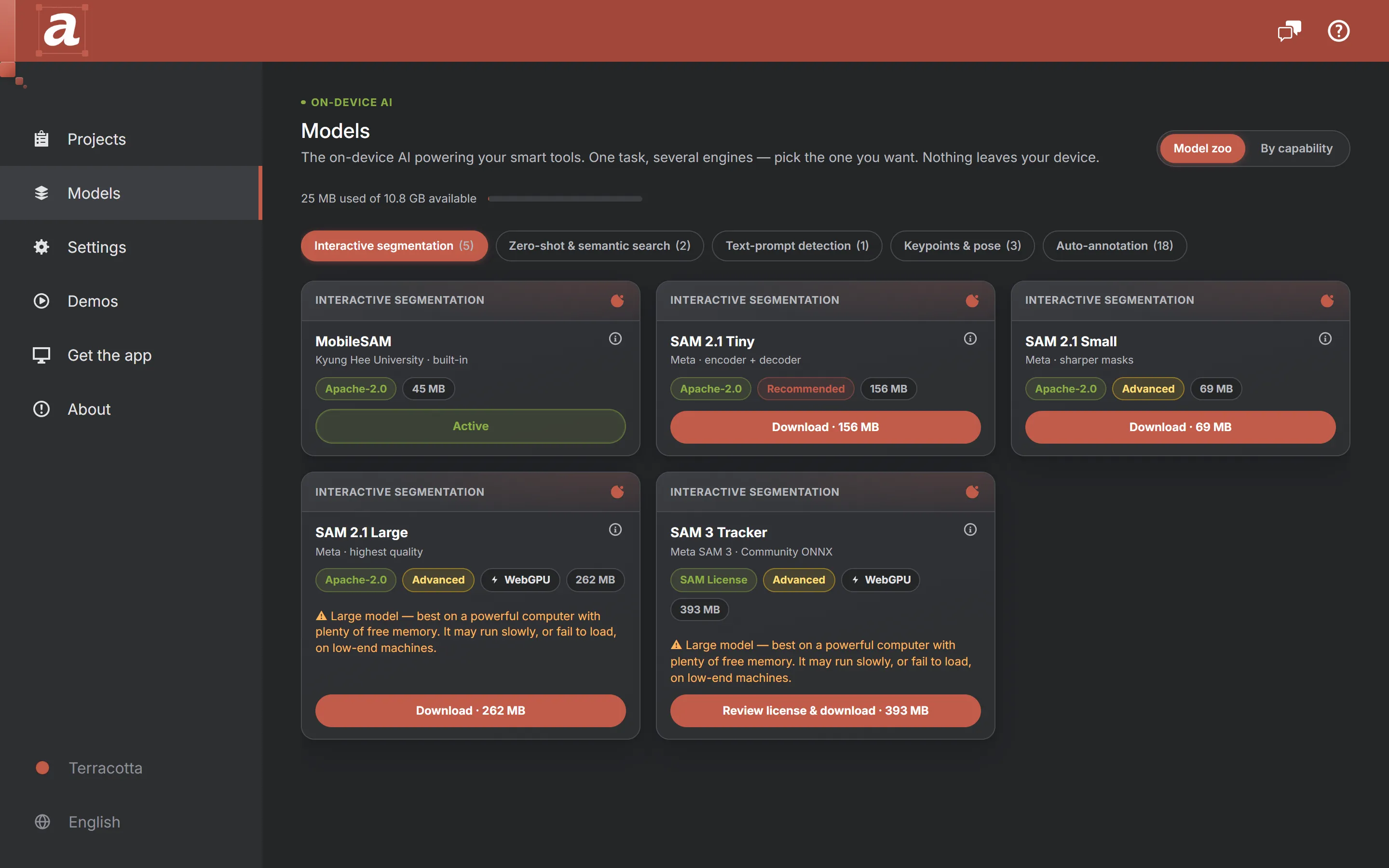
Exact download sizes come from a manifest at runtime, so the page in the app is the accurate source rather than this one. What is stable is the shape of the choice: one built-in engine that always works, and heavier optional ones that trade download size and speed for quality.
Two ways to look at it
- Model zoo — the page opens here. A browsable gallery, one capability at a time, so what you are comparing is always a set of genuinely interchangeable engines rather than a mixed pile.
- By capability — one section per capability, each naming its active engine with its alternatives laid out as cards. The clearest answer to "what am I using, and what could I use instead?".
What a card tells you
| Field | Why it is there |
|---|---|
| Licence | A first-class badge, not a footnote. Some engines are Apache-2.0 or MIT; SAM 3 Tracker ships under Meta’s SAM License, which you accept before the download starts |
| Size | The download, and the local storage it will occupy |
| Runtime | Whether the engine runs on the CPU/WASM path or needs WebGPU |
| Speed and accuracy | Relative meters in the By-capability view, so the trade-off between two engines of one capability is visible before you spend the download |
| Status | Live install state — not installed, downloading, ready, or in use |
| Requirements notice | Shown on engines whose estimated runtime memory is large enough to need a capable machine. It warns; it never blocks |
Why an engine can be unavailable
A card can read "not available on this device", and it means exactly that rather than "buy something". Three gates decide it:
- WebGPU. Some engines only run on the WebGPU path. Availability is probed by actually requesting an adapter, not by checking whether the API exists — a browser can expose WebGPU and still hand back nothing.
- Downloadable engines at all. iPhone and iPad run the bundled built-ins only, so the Models page is not part of the mobile build: it would be a wall of refusals answering no question.
- Model size. Each platform has a memory budget, compared against an estimated runtime peak rather than the file size — a model’s in-memory footprint is a multiple of what it weighs on disk.
One deliberate exception is worth knowing: the SAM 2.1 decoder stays on the CPU path even when WebGPU is available, because the WebGPU route produces wrong masks in the current ONNX Runtime web build. The encoder still uses WebGPU, which is where the time goes.
Auto-annotation model families
Alongside the interchangeable engines above, the Models page has an Auto-annotation section: curated, ready-to-use object detectors — D-FINE, RT-DETR, RT-DETRv2, DEIM and RF-DETR — plus EdgeCrafter ECDet, with EdgeCrafter ECSeg and RF-DETR Seg for instance segmentation. 8 families, 24 released variants, all predicting the 80 COCO classes, all Apache-2.0, and all running locally on the CPU. They differ from the capabilities above in how you use them: rather than swapping a global engine, you download a variant and set it up inside a matching project. They are also distinct from importing your own ONNX — the curated families are weights AnnotateIt hosts and pre-configures, not files you supply. Their own page covers every family, the setup flow and the review queue.
The project Models page
A project has its own Models page too, and it answers a different question: what is annotating this project right now. It shows the engines relevant to the project’s task, the curated Auto-annotation models set up for it, the custom ONNX models imported into it, and — once the project has at least one annotated image — the visual-prompt panel, which takes objects you already drew as examples and finds similar ones. Visual prompting runs on whichever segmentation engine is active, so switching engines switches its backbone too.
Storage
Downloaded engines are files on your device and are listed with what they occupy. Removing one frees the space and falls back to the built-in engine for that capability; downloading it again is the only thing that ever needs the network. Native desktop builds ship the built-in engines inside the install — MobileSAM for interactive segmentation and CLIP for zero-shot — so a fresh desktop machine can segment, classify zero-shot and run the annotator’s Text prompt tool with no download at all. The capabilities with no built-in engine of their own — Text prompt (Grounding DINO Tiny) and Keypoints (RTMPose) — are a download on every platform that can run them.