Object detection
Bounding boxes, without the busywork
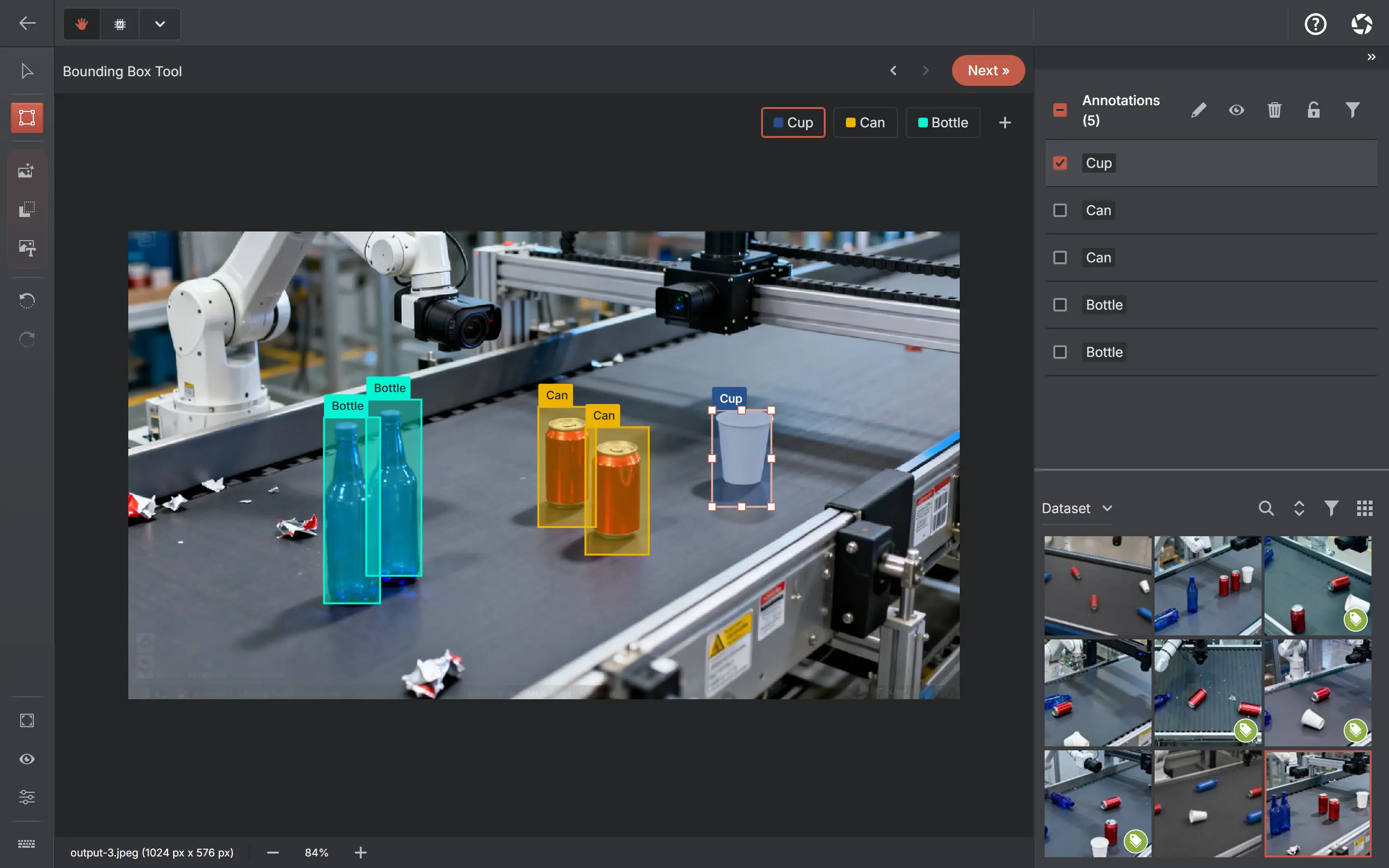
Draw boxes by hand when an image needs a careful eye, or describe the object in plain words and review what the detector proposes. Local detectors keep images on your machine. Optional annotation with ChatGPT or Claude sends the attached image to the selected provider (OpenAI or Anthropic) for conversational annotation.
Six ways to get boxes
By hand
Draw, move and resize boxes in the annotator. Manual labeling for the images where precision matters most.
From a text prompt
Type what you are looking for — "forklift", "helmet", "red car" — and open-vocabulary detection with Grounding DINO proposes boxes for you to accept or reject.
From a ready-made detector
Download one of the curated auto-annotation detectors — D-FINE, RT-DETR, RT-DETRv2, DEIM, RF-DETR or EdgeCrafter ECDet — and pre-label with it. No weights to supply and no training: you map its 80 COCO classes to your labels, and the checkpoint is verified on your device before it runs. All local, on your CPU.
From your own examples
Two ways, and they are not the same one. The detection assistant boxes one example and finds every lookalike in that image. Find by example takes the objects you have already annotated across the project as references and proposes similar ones on the image you are on.
Across the whole dataset
Auto-annotate in one batch: point a set-up detector, a text prompt or a visual prompt at the whole dataset, a selection or your search results. Every prediction waits in a review queue — kept out of exports, versions and statistics — until you confirm it, and the run resumes if you close the app mid-way.
From your own weights
Import a trained YOLOv8, RT-DETR or DETR as ONNX and pre-label with it — segmentation, pose and classification models are supported the same way in their project types. Experimental, and it makes you run a real test before it will save.
Ready-to-use detectors
Download a curated detector — D-FINE, RT-DETR, DEIM and more — from the Models page and set it up in your project: map its 80 COCO classes to your labels, test on one of your images, save. Each runs on your CPU, and setup checks the downloaded file against its published specification before it can label a thing.
Create a detection project, drop in images — or a video, which you can annotate in place with keyframe tracks or split into frames on your device — and export to YOLO, COCO, Pascal VOC, Datumaro, KITTI or MOT when the dataset is ready. Import works too, so you can fix or extend a set you already have.
Common questions
Is the detection model running in the cloud?
No. Grounding DINO, the detection assistant, the curated auto-annotation detectors and any model you import all run on your hardware. The web app downloads model files once and caches them; these local tools do not upload your images. Optional ChatGPT or Claude annotation is an online connection.
Does AnnotateIt include ready-made detection models?
Yes. A curated set of auto-annotation detectors — D-FINE, RT-DETR, RT-DETRv2, DEIM, RF-DETR and EdgeCrafter ECDet — downloads from the Models page and sets up inside a project: map its 80 COCO classes to your labels, test on one of your images, save. Each ships pre-configured and is verified on your device before it saves, and every one runs locally on your CPU. No weights to supply and no training — that is what separates them from importing your own model.
Can I use my own detector?
Yes — an experimental wizard imports YOLOv8 detection models, RT-DETR and DETR as ONNX files up to 512 MB. It inspects the file, maps its classes to your labels and requires a successful test run before saving.
Which export formats carry bounding boxes?
For image datasets: YOLO, COCO, Pascal VOC, Datumaro and KITTI. Video detection exports as MOT or Supervisely Video. Pick whichever your training stack expects.
What are the ready-to-use detection models?
Curated object detectors — D-FINE, RT-DETR, DEIM and others — that you download from the Models page instead of training or importing your own. Each is trained on the 80 COCO classes, runs on your CPU, and is verified against its published specification when you set it up in a project. Predictions from a batch run wait in a review queue until you accept them.
Open AnnotateIt in your browser
Create your first local project in the browser. Optional ChatGPT or Claude annotation needs your own AI connection.
Questions before you start?Contact support →