Keypoints, skeletons and pose assistance
A keypoint project is built around one skeleton template, and each subject is an independent pose. Manual keypoints work on every platform. Web and desktop add Auto-pose for the exact COCO-17 human template through a downloadable on-device RTMPose engine; mobile omits it. COCO Keypoints export and import carry the whole structure both ways.
The skeleton template
Before you annotate anything, a keypoint project needs to know what a subject looks like: which joints exist, what they are called and which pairs are connected. That template is defined per project, so different projects can use completely different skeletons — a human pose, a vehicle, a hand, an insect. In the project sidebar the Labels entry is replaced by Template, because in a keypoint project the labels are the joints.
The template also carries a layout: where each joint sits in a normalised reference pose. That is what lets a new annotation start from a sensible arrangement instead of a pile of points at the origin, and it is what a COCO Keypoints import rebuilds from the data it finds.
Several skeletons per image
Keypoint projects are multi-instance. Every subject you annotate is a separate object with its own set of points, and the joints of one skeleton are bound together by an ownership key rather than by being "the pose of this image". A crowd scene is as many poses as it has people, and each is selected, edited, exported and quality-checked independently.
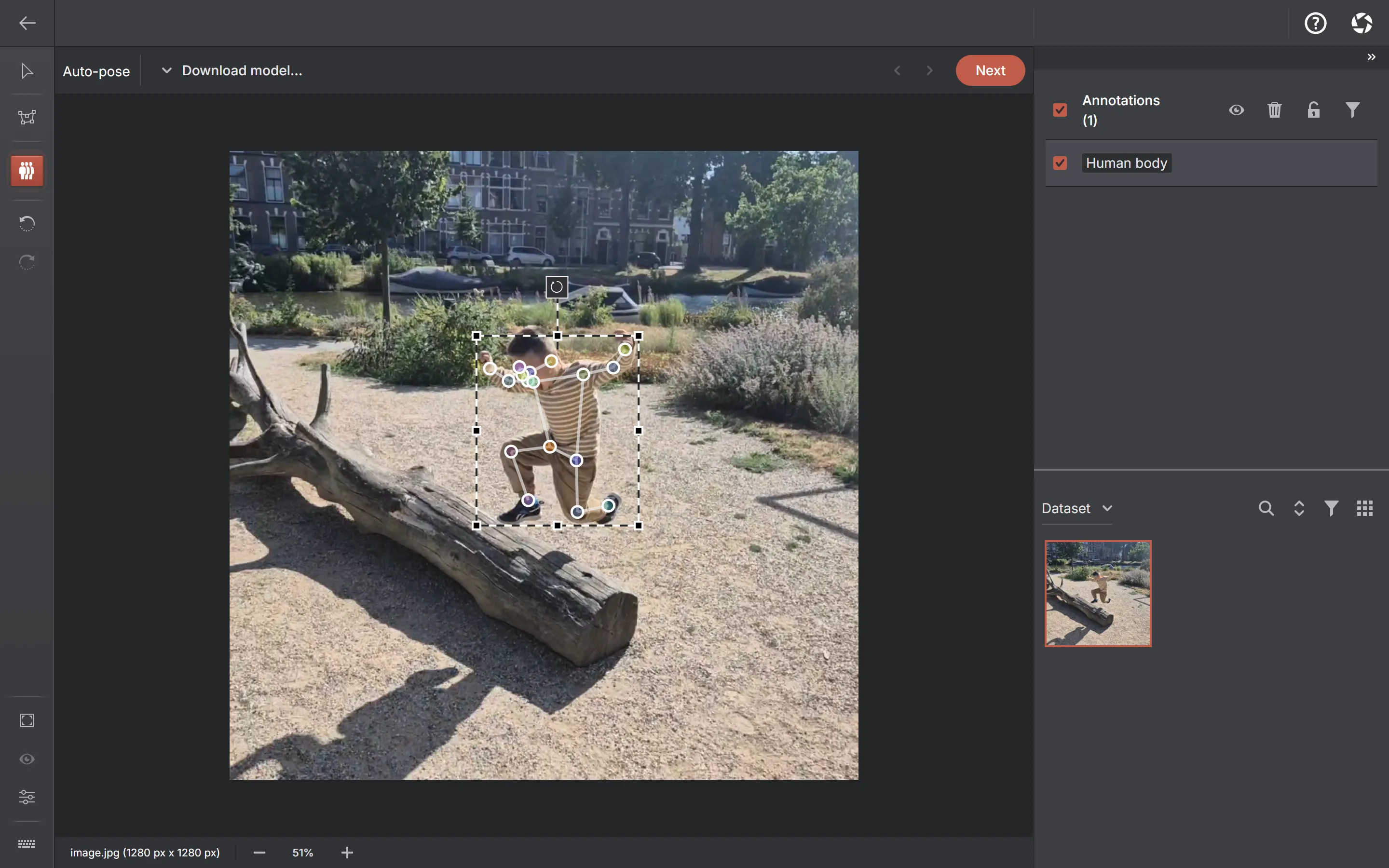
Annotations made before this existed still work. An older single-pose annotation carries no ownership key and is treated as one skeleton, so nothing had to be migrated and nothing was lost.
Auto-pose
Auto-pose is its own tool on the toolbar. Draw a box around a person, and an on-device model places all 17 COCO keypoints onto your template — you then correct the ones it got wrong instead of placing seventeen points yourself. Run it once per person; each run produces a separate skeleton.
| Engine | Trade-off |
|---|---|
| RTMPose-m | The fast default — the recommended starting point |
| RTMPose-l | More accurate, larger, slower |
| RTMPose-x | The best quality of the three, and the heaviest; the card warns when a machine may struggle |
The tool appears only when your template is the full 17-point COCO human skeleton, because that is what the model predicts. A partial or non-human template gets the manual keypoint tool alone — the tool is simply absent rather than present and producing a wrong-looking skeleton. It also needs a platform that can run downloadable engines, so it is not offered on iPhone and iPad.
A run started on one image survives leaving and returning to the tool, so switching away mid-inference does not lose the work. Like every engine here, the model is downloaded once and runs on your hardware; the image is never uploaded.
Export and import
COCO is the recommended format for keypoints, and the export follows the COCO person-keypoints convention: a category carrying the joint names and a 1-based skeleton array describing your edges, then one annotation per pose with a flat array of x, y and visibility triples, num_keypoints, and a bounding box derived from the placed points. Files are named person_keypoints_default.json, or person_keypoints_train/val/test.json in split mode.
- Importing a COCO Keypoints archive rebuilds the template — joint names and edges — from the file, and brings in every pose in the file as its own skeleton.
- Datumaro and the project archive keep the full structure including per-joint visibility.
- YOLO and Pascal VOC have no keypoint representation; a pose exports as its bounding box there.
- Keypoints cannot be tracked across video frames yet: interpolating a skeleton needs semantics that boxes and polygons do not, so tracks are unavailable in keypoint projects.
What the quality scan checks
The shape-validity check covers skeletons too: non-numeric or infinite coordinates, points placed outside the image, and skeletons inconsistent with the project template are all reported. Object-size statistics deliberately exclude keypoints, because a set of points has no meaningful area.