Keypoint detection
Keypoints, with the tedious part automated
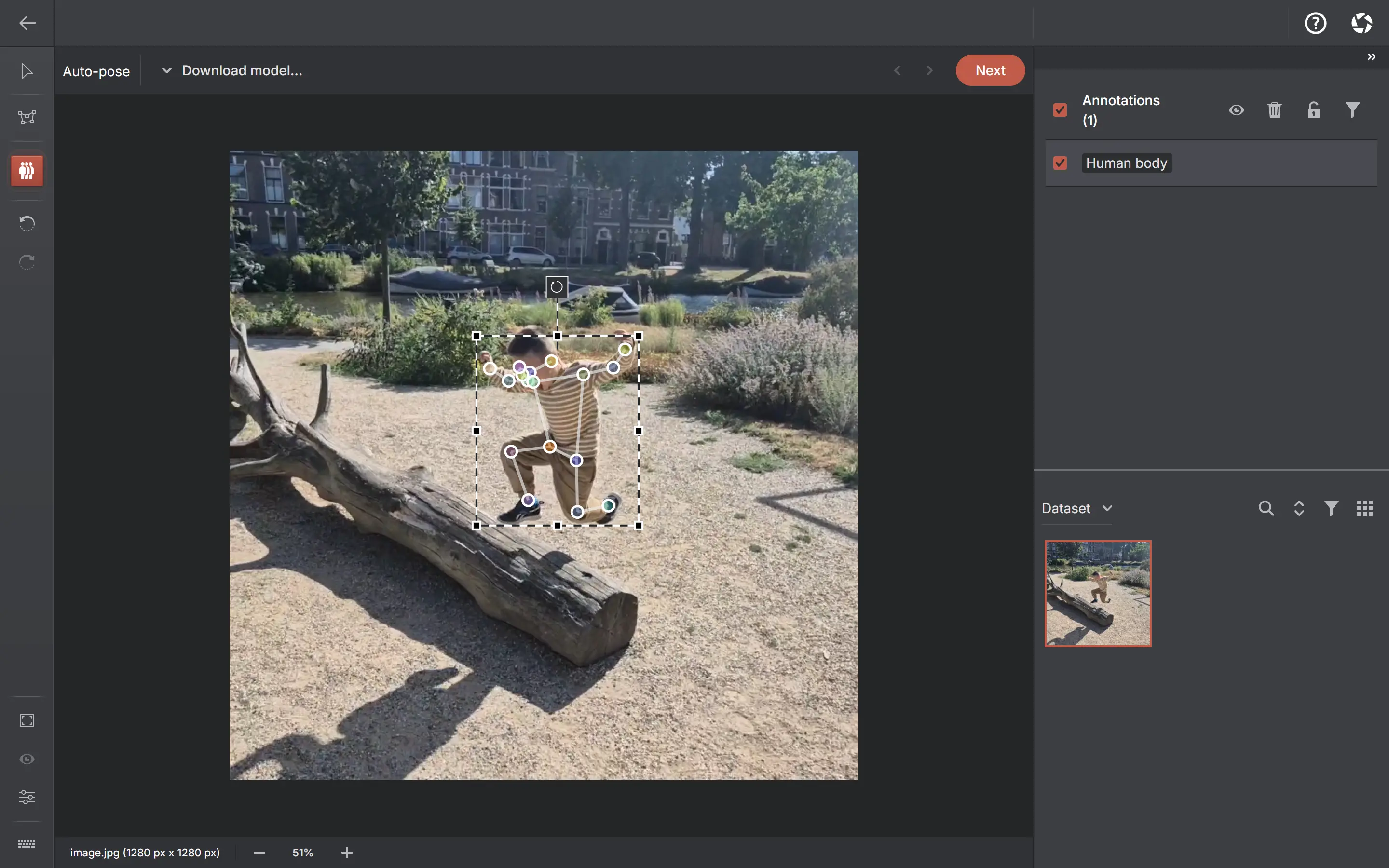
Every keypoint project has a skeleton template — joints and the edges between them. Place points by hand, or let pose assistance do the first pass on people. One image can carry as many skeletons as it has subjects.
Related video tutorial
See this workflow in action
Auto-Label Human Poses
RTMPose keypoints in seconds, 100% on-device
Skeletons and assistance
Skeleton templates
Define the joints and edges once when you create the project; every annotation follows the same structure.
Auto-pose
Its own tool on the toolbar: draw a box around a person and RTMPose proposes all 17 COCO keypoints onto your template. You adjust the points it got wrong instead of placing each one yourself.
Several people per image
Each skeleton is its own object, so a crowd scene is as many poses as it has subjects — drawn, selected, exported and quality-checked independently.
Three model sizes
RTMPose-m for speed, RTMPose-l for accuracy, RTMPose-x for the best quality it can manage. Pick one on the Models page; the heavier two warn you when they need a capable machine.
Images and video frames
Add native video and annotate poses frame by frame, without object tracks — or extract selected frames as images on your device.
The pose models are on-demand downloads that run locally — independently of the optional online ChatGPT workflow. Your images are never uploaded. A COCO Keypoints export carries the joint names, the 1-based skeleton and per-point visibility, and re-importing one rebuilds the template.
Common questions
Does pose assistance work on animals?
The pose models are trained on people — the 17 COCO keypoints. Auto-pose is therefore offered only when your template is the full COCO-17 human skeleton; for any other template you get the manual keypoint tool, and it is simply absent rather than present and wrong.
Can I define my own skeleton?
Yes. The skeleton template — its joints and edges — is defined per project, so different projects can use different skeletons.
Can one image have more than one skeleton?
Yes. Keypoint projects are multi-instance: every pose is a separate object with its own points, and imports of multi-person COCO Keypoints files bring each instance in separately.
Where does the pose model run?
On your hardware. It is downloaded once, cached, and never sends your images anywhere.
Open AnnotateIt in your browser
Create your first local project in the browser. Optional ChatGPT or Claude annotation needs your own AI connection.
Questions before you start?Contact support →