Comparison

AnnotateIt as an X-AnyLabeling alternative

Short answer

AnnotateIt is best suited to users who want local AI-assisted annotation through stores or a browser. X-AnyLabeling can also be installed from packaged releases without setting up Python. X-AnyLabeling offers open source, a broad model catalog, packaged releases and an external Ultralytics training workflow.

X-AnyLabeling and AnnotateIt agree on the main thing: annotation and models belong on your machine. They differ in how much setup they expect from you — and in how models get into the tool.

Annotate with ChatGPT or Claude

Describe it. Refine it. Review it on the canvas.

Ask for boxes, segmentation polygons or image classes in plain language. Work with one image or video frame in chat, or give Auto-annotate one instruction for a batch of images. Review the results directly in AnnotateIt.

  1. 01

    Ask in context

    Open Annotate with ChatGPT or Claude above Next. The current image or frame is attached by default; you can turn it off.

  2. 02

    Refine together

    Create, rename, recolor or delete project labels with confirmation. Ask follow-up questions to refine pending boxes or polygons.

  3. 03

    Accept or reject

    Review the usual AI suggestions on the canvas. Use the existing Accept / Reject controls; the chat reports when nothing was annotated.

Optional online feature: an attached chat message sends one image or one frame and context to your selected provider, OpenAI or Anthropic. Starting an assistant batch sends eligible images and project labels from your chosen scope. No whole-video or keypoint generation. Local AI tools remain separate.

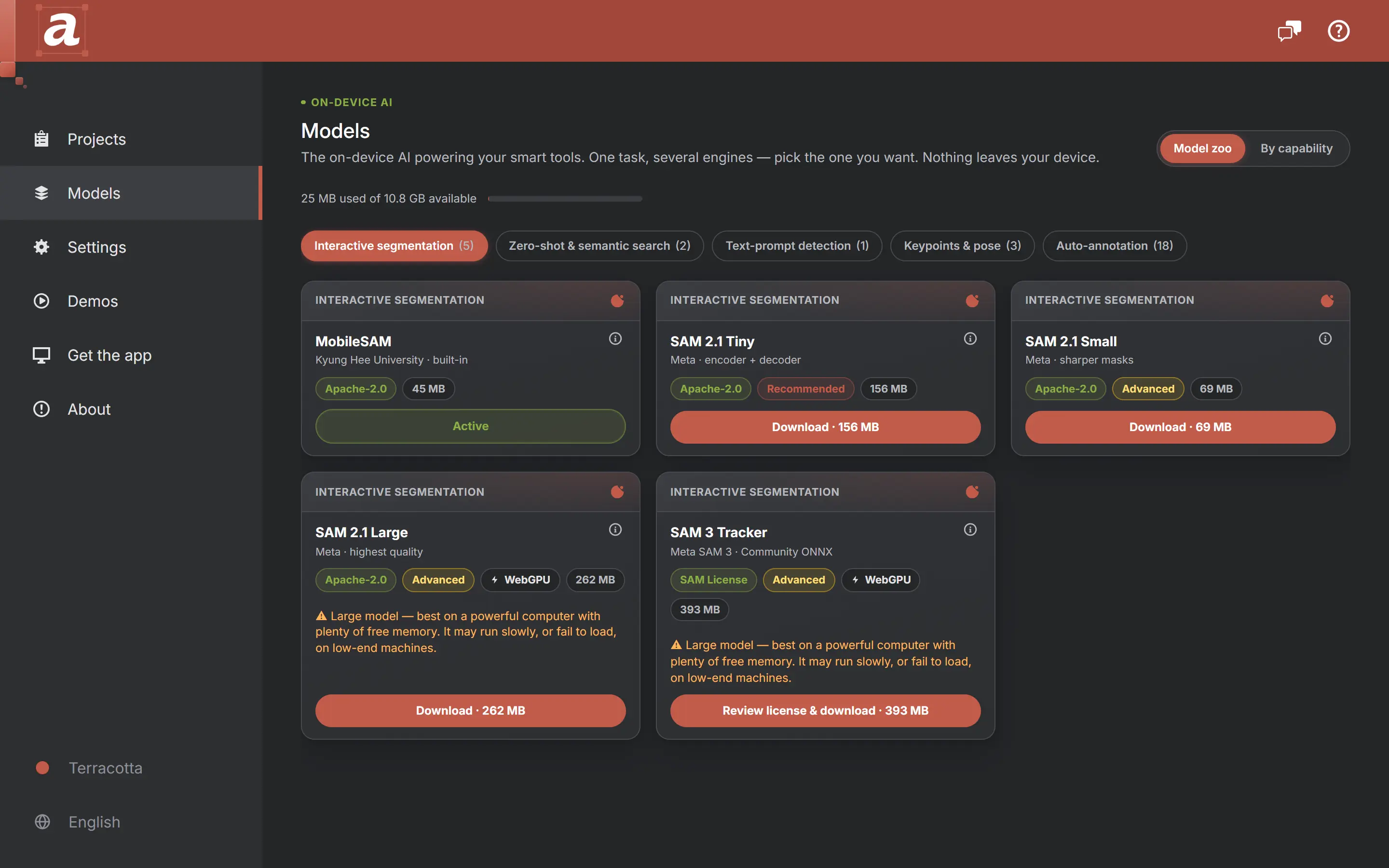
The AnnotateIt Models hub: local AI engines grouped by capability, including a curated Auto-annotation family of detectors, each with its licence, size and download status.

X-AnyLabeling is a good fit when

  • You are comfortable with GitHub releases or a Python environment
  • You want a very broad zoo of auto-labeling models out of the box
  • Free and open source is a hard requirement
  • You script and customize your tooling

AnnotateIt is a good fit when

  • You want signed store installs and automatic updates — or no install at all
  • You prefer curated engines plus a guided flow for adding your own ONNX model
  • You need iPhone, iPad or browser access; X-AnyLabeling also supports macOS, Windows and Linux
  • You prefer store delivery or browser access for onboarding
X-AnyLabelingAnnotateIt
Conversational annotation & labelsX-AnyLabeling has a multimodal chatbot, image questions, batch processing and ShareGPT export, with remote providers and local Ollama support. AnnotateIt emphasizes turning the conversation into native canvas suggestions and confirmed project-label changes.

X-AnyLabeling 4.0.6 chatbot

Chat and batch image annotation → editable boxes, polygons or image classes → standard Accept / Reject. Auto-annotate supports a shared instruction, up to 2 concurrent API image requests, progress, cancellation and resume in Pending AI Review. Desktop Codex and Claude Code run sequentially. Chat also manages project labels with confirmation.
DistributionGitHub releases or a Python environment

X-AnyLabeling 4.0.6 — September 5, 2026X-AnyLabeling on GitHub

Microsoft Store, Mac App Store, App Store — or the browser
Model zooVery broad: many detectors, segmenters and more

X-AnyLabeling 4.0.6 — September 5, 2026X-AnyLabeling on GitHub

Curated set — SAM, SAM 2.1, SAM 3, Grounding DINO, SigLIP 2, RTMPose, plus ready-made auto-annotation detectors (D-FINE, RT-DETR, RT-DETRv2, DEIM, RF-DETR, EdgeCrafter ECDet) and the RF-DETR Seg and EdgeCrafter ECSeg segmenters — and guided custom ONNX import (YOLOv8 detection, segmentation and pose, RT-DETR, DETR, classifiers; experimental)
SetupDownload a release or set up Python

X-AnyLabeling 4.0.6 — September 5, 2026X-AnyLabeling 4.0.6 external Ultralytics training

None beyond the install
AccountsNo application account for local work; external AI providers may require credentials

X-AnyLabeling 4.0.6 chatbot

No application account for local work; external AI providers require access
TrainingVersion 4.0.6 includes external Ultralytics training with an isolated Python environment, dataset snapshots, background jobs and ONNX export

X-AnyLabeling 4.0.6 external Ultralytics trainingX-AnyLabeling 4.0.6 — September 5, 2026

Experimental desktop integration with an external TAO RT-DETR runner; no built-in Ultralytics training
Video and trackingModel-assisted multi-object tracking and interactive video segmentation are documented; available models and setup depend on the installed version

X-AnyLabeling on GitHub

Manual keyframe tracks and interpolation. SAM 3 Tracker is used for still-image masks, not automatic identity tracking through video
Point cloudsThe September 18 source update adds point-wise semantic/instance labels, camera reference images and calibrated overlays. This is newer than the September 5 packaged 4.0.6 release

X-AnyLabeling source snapshot — September 19, 2026X-AnyLabeling 4.0.6 — September 5, 2026

Experimental static PLY/PCD semantic segmentation on desktop/web; no instance IDs, cuboids, sequences or calibrated camera overlays
PriceFree, open source

X-AnyLabeling on GitHub

Currently free with unlimited projects; no paid upgrade

Last reviewed: September 19, 2026

Official-source review: September 19, 2026. Packaged release 4.0.6 (September 5) and a separately identified September 19 source snapshot. The September 18 point-cloud addition is newer than that release; do not assume it is present in its downloadable binaries. Local operation excludes optional remote model/chat providers.

Sources:X-AnyLabeling 4.0.6 — September 5, 2026X-AnyLabeling on GitHubX-AnyLabeling 4.0.6 external Ultralytics trainingX-AnyLabeling 4.0.6 chatbotX-AnyLabeling source snapshot — September 19, 2026X-AnyLabeling 4.0.6 chatbot

Which situation is yours

The reasons people look for an X-AnyLabeling alternative

These two tools already agree about the important thing — local data, local models — so several of the usual comparison angles come out level. Where that happens, this page says so instead of inventing a difference.

An X-AnyLabeling alternative for individual developers

X-AnyLabeling is already an individual developer’s tool, so the difference is not who it is for — it is what it expects on the way in. A GitHub release or a Python environment is nothing to someone who lives in one, and a different distribution route from app stores or browser access; packaged releases do not require building a Python environment.

AnnotateIt trades breadth for that: signed store installs with automatic updates, a browser build with no install at all, and a curated set of engines instead of a large zoo. If you script and customise your tooling, X-AnyLabeling gives you more to work with and this page will not pretend otherwise.

  • Store install or a browser tab rather than a release archive or a Python environment
  • Curated engines plus a guided, test-gated wizard for your own ONNX file
  • The same product on Windows, macOS, iPad and the web
  • X-AnyLabeling offers a broad model catalog, external training, scriptability and open source

For private datasets, both already qualify

Worth stating plainly rather than claiming an advantage: X-AnyLabeling has local annotation and local models. Its optional remote models and chatbot providers can send data externally, just as optional provider connections do in AnnotateIt. Compare the configured workflow, not just the application name.

The one thing that differs is what a security review can lean on. A store-distributed, signed and sandboxed build with a published data-flow document is easier to get approved in some organisations than a self-assembled Python environment — and harder in others, where auditable source is the requirement and open source wins. Both are legitimate; know which kind of reviewer you have.

Neither of these needs Docker

X-AnyLabeling and AnnotateIt run as local applications without an annotation-server deployment. Self-hosted CVAT and Label Studio use a server stack; their hosted offerings avoid that local setup too. AnnotateIt desktop can optionally expose a loopback API, so running locally does not mean it never opens a port.

X-AnyLabeling vs AnnotateIt, in one paragraph

Same conviction, different packaging. X-AnyLabeling is free, open source and model-rich, distributed the way developer tools usually are, and it rewards someone willing to set it up and script around it. AnnotateIt is installed from a store or opened in a tab, curated engines that work on first launch, a guided wizard for bringing your own ONNX, and the same app across Windows, macOS, iPad and the browser — currently free on every supported platform. Pick X-AnyLabeling for breadth and openness; pick AnnotateIt when you want the local-first idea to arrive already assembled.

Migration guide

Moving a dataset from X-AnyLabeling

  1. Export from X-AnyLabeling to COCO, YOLO or Pascal VOC using its converters.
  2. Create the matching AnnotateIt project and import the archive.
  3. Review labels and annotations in the media grid before continuing.

Common questions

Is AnnotateIt open source?

No. The public GitHub organisation hosts the issue tracker and the roadmap, not the application source. If open source is a hard requirement, X-AnyLabeling is the honest recommendation.

Can I use the same models I use in X-AnyLabeling?

Sometimes. The import wizard accepts YOLOv8 detection, segmentation and pose, RT-DETR, DETR and plain image classifiers as ONNX files up to 512 MB, and rejects output shapes it does not recognise rather than guessing. A broader zoo is exactly where X-AnyLabeling is stronger.

Does the browser build really need no install?

None. It opens in a tab, keeps projects in local storage on the device, and downloads AI engines on first use before caching them. For a machine that will never see the internet, use a native build instead — those bundle the default engines.

See it on a real project first

AnnotateIt ships ready-made, fully annotated sample projects. Open one and click around — the annotator, the AI tools, the export flow — before importing anything of your own.

Open a sample project

Try it without an account

Create a local project without an AnnotateIt account. Projects stay on your device; optional external AI and ML connections have their own data transfers and account requirements.

Video tutorial

AnnotateIt tutorial