Comparison

Looking for RectLabel on Windows?

Short answer

AnnotateIt is best suited to individual computer vision engineers and researchers who want RectLabel’s local, no-cloud workflow on Windows — or across Windows, macOS, iPad and the browser at once. The official downloads list macOS applications; AnnotateIt is an independent cross-platform option.

RectLabel is built for the Mac. If you are searching for a Windows version, what you probably want is the same idea — a native, local annotation app with no cloud dependency — on a PC. That is what AnnotateIt is. It runs on the Mac too.

Annotate with ChatGPT or Claude

Describe it. Refine it. Review it on the canvas.

Ask for boxes, segmentation polygons or image classes in plain language. Work with one image or video frame in chat, or give Auto-annotate one instruction for a batch of images. Review the results directly in AnnotateIt.

  1. 01

    Ask in context

    Open Annotate with ChatGPT or Claude above Next. The current image or frame is attached by default; you can turn it off.

  2. 02

    Refine together

    Create, rename, recolor or delete project labels with confirmation. Ask follow-up questions to refine pending boxes or polygons.

  3. 03

    Accept or reject

    Review the usual AI suggestions on the canvas. Use the existing Accept / Reject controls; the chat reports when nothing was annotated.

Optional online feature: an attached chat message sends one image or one frame and context to your selected provider, OpenAI or Anthropic. Starting an assistant batch sends eligible images and project labels from your chosen scope. No whole-video or keypoint generation. Local AI tools remain separate.

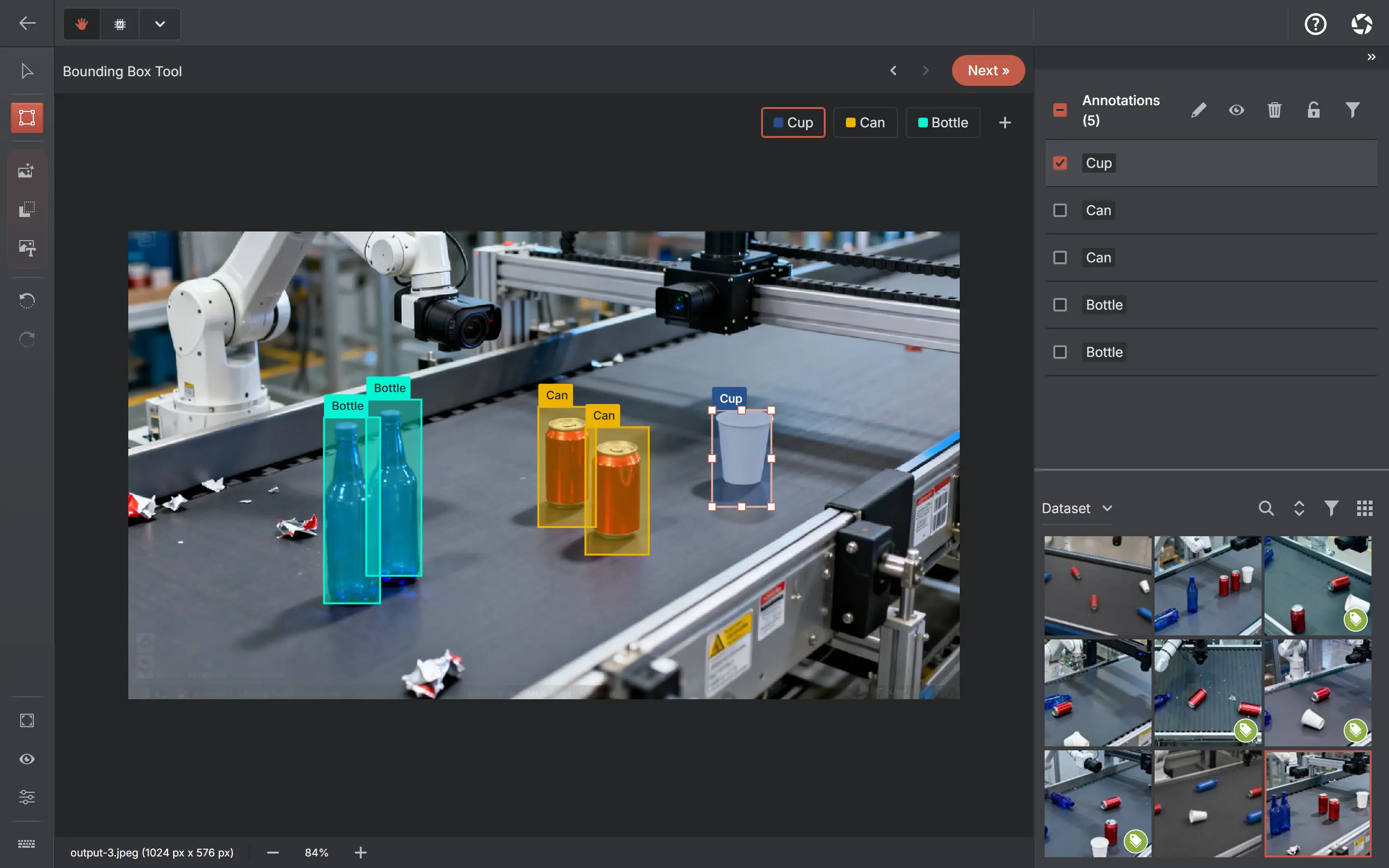
The AnnotateIt annotator on a detection project with labeled bounding boxes.

RectLabel is a good fit when

  • You work on macOS and want a long-established Mac-native annotator
  • Your workflow is built around its Core ML integrations

AnnotateIt is a good fit when

  • You need the same local workflow on Windows 10 or 11
  • You move between Windows, macOS, iPhone & iPad, or the browser
  • You want on-device AI assistance: one-click masks, text-prompt detection, pose
  • You want currently free access without a paid upgrade
RectLabelAnnotateIt
Conversational annotation & labelsRectLabel documents Core ML automatic labeling and SAM text/box prompts. Its reviewed feature page describes these model-driven tools; it does not establish an equivalent ChatGPT canvas-and-label conversation.

RectLabel features

Chat and batch image annotation → editable boxes, polygons or image classes → standard Accept / Reject. Auto-annotate supports a shared instruction, up to 2 concurrent API image requests, progress, cancellation and resume in Pending AI Review. Desktop Codex and Claude Code run sequentially. Chat also manages project labels with confirmation.
PlatformmacOS

RectLabel

Windows, macOS, iPhone & iPad, web
InstallMac App Store

RectLabel

Microsoft Store, Mac App Store, App Store — or none (web)
Data locationOffline annotation on the Mac; standard-app purchases use networking

RectLabelRectLabel trial, subscription and Pro license

Local annotation; optional provider and runner connections send selected data
Manual tools and videoOriented boxes, skeleton keypoints, curves, lines, pixel brushes and superpixels; video frame extraction and box tracking

RectLabel

Boxes, polygons, polylines, skeletons and brush masks; manual video keyframes/interpolation and frame extraction
Search and image preparationGallery search by object, attribute, image name and memo; image augmentation tools

RectLabel

Metadata filters and local semantic search on supported platforms; pixel editing, versions, integrity checks and splits
AI assistanceSAM 3 text/box prompts, SAM 2, Cellpose, Core ML auto-labeling (including RF-DETR and YOLO26), OCR and box tracking

RectLabelRectLabel Core ML menu

On-device SAM, SAM 2.1, SAM 3, Grounding DINO, SigLIP 2, RTMPose
FormatsCOCO, Pascal VOC, YOLO and others

RectLabel

COCO, YOLO, Pascal VOC, Datumaro, MOT, MOTS, KITTI, Supervisely Video and plain ZIP
Pricing modelStandard app: trial then subscription. Pro: one-time license. Both include all features; see current regional store terms

RectLabel trial, subscription and Pro license

Currently free with unlimited projects; no paid upgrade

Last reviewed: September 19, 2026

Official-source review: September 19, 2026. Official macOS application, feature/help pages and Standard/Pro licensing. SAM wrapper repositories are separate components, not evidence of a Windows application. No assertion of identical features or lossless cross-application migration is intended.

Sources:RectLabelRectLabel trial, subscription and Pro licenseRectLabel Core ML menuRectLabel features

Which situation is yours

The reasons people look for a RectLabel Windows alternative

Almost everyone who searches for this is really asking one question — is there a Windows version? There is not, so the useful answer is which of RectLabel’s properties you actually needed.

The official RectLabel downloads target macOS

The official RectLabel site links to macOS applications. Its SAM wrapper repositories are separate components, not a supported Windows edition of the annotation app.

What transfers is the shape of the thing: a native app you install once, that keeps images and annotations on the machine, with no account and no cloud step. AnnotateIt installs from the Microsoft Store on Windows 10 and 11, and runs on macOS, iPhone and iPad and in the browser from the same codebase — so a mixed-machine setup stops being a problem to solve.

  • Microsoft Store install on Windows 10 and 11, signed and updated through the store
  • The same product on macOS if you are keeping the Mac too
  • Images and annotations stay on the device, as they did in RectLabel
  • COCO and Pascal VOC import, so an existing RectLabel dataset comes straight across

A RectLabel alternative for individual developers

RectLabel already offers modern local AI: SAM 3 text/box prompts, SAM 2, Cellpose, Core ML labeling, OCR and tracking. AnnotateIt offers its own local model selection, semantic search and dataset tools across several platforms. This is a workflow and platform choice, not an AI-versus-no-AI comparison.

AnnotateIt also includes local dataset versions with restore/diff, integrity checks and train/validation/test splits. RectLabel has its own model-error inspection workflow; these features should be compared individually, rather than treating desktop tools as annotation-only.

A RectLabel alternative for private datasets

Both tools keep your images on the machine, so this is not a difference between them — it is the property you would lose by replacing RectLabel with a hosted platform. If privacy is why you liked RectLabel, moving to a cloud annotation service to solve the Windows problem trades away the thing you were trying to keep.

AnnotateIt’s native builds bundle the default AI engines, so an air-gapped or restricted Windows workstation runs the whole loop — import, annotate with built-in model assistance, export — with no network at all. The published data-flow and security documents are written for the review that usually follows.

RectLabel vs AnnotateIt, in one paragraph

RectLabel is a Mac desktop annotator with a trial/subscription standard edition and a one-time Pro license, plus SAM, Cellpose, OCR, tracking and Core ML tools, and if you are on a Mac and happy there is no reason to move. AnnotateIt is the same local, no-cloud idea built cross-platform: Windows, macOS, iPhone and iPad, and the browser, with on-device SAM-family segmentation, SigLIP 2, RTMPose and Grounding DINO where each runtime is supported, plus dataset versions and quality checks, free access without a paid upgrade. The comparison is not really feature-by-feature — it is that one of them runs on your PC and the other does not.

Migration guide

Moving from RectLabel to a PC

  1. In RectLabel, export your annotations as COCO or Pascal VOC.
  2. Create the matching project in AnnotateIt on your Windows machine and import.
  3. Projects live locally on the new machine — there is no cloud account to migrate.

Common questions

Is there any way to run RectLabel on Windows?

Not a supported one. It is distributed through the Mac App Store as a macOS application. If you need this workflow on a PC, you need a different application, not a workaround.

Will my existing RectLabel annotations import?

Yes, through standard formats. Export COCO or Pascal VOC from RectLabel, create the matching project type in AnnotateIt and import the archive. The transfer can remain local. Test representative shapes, attributes and class mappings; standard formats do not preserve every application feature.

Do I have to buy it to find out whether it fits?

No. The web app opens without an account, and every platform is free with unlimited projects. There is no paid upgrade or subscription.

See it on a real project first

AnnotateIt ships ready-made, fully annotated sample projects. Open one and click around — the annotator, the AI tools, the export flow — before importing anything of your own.

Open a sample project

Try it without an account

Create a local project without an AnnotateIt account. Projects stay on your device; optional external AI and ML connections have their own data transfers and account requirements.

Video tutorial

AnnotateIt tutorial